> ## Documentation Index
> Fetch the complete documentation index at: https://docs.rampnow.io/llms.txt
> Use this file to discover all available pages before exploring further.

# Onramp Flow

> Step-by-step overview of the complete fiat-to-digital-asset purchase journey

<Info>
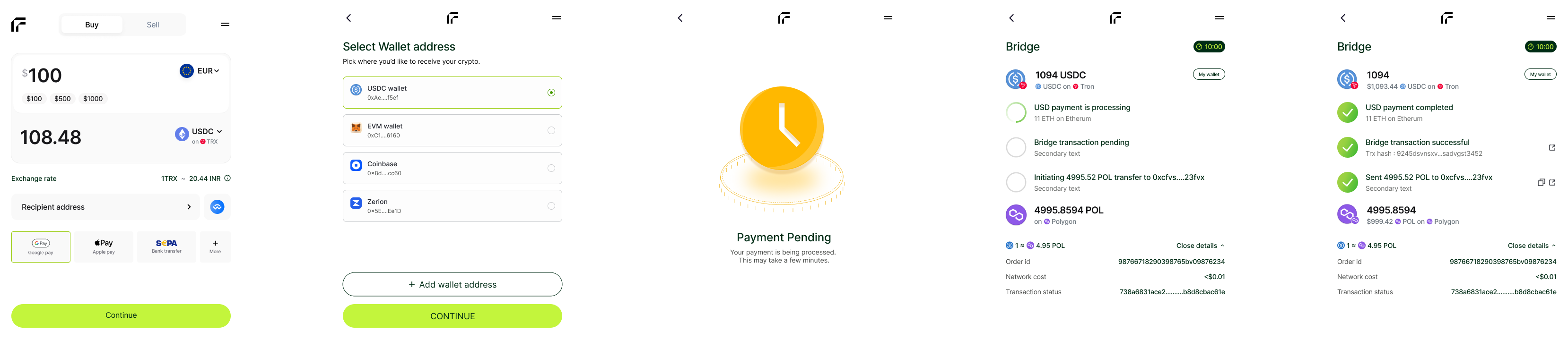
  This guide walks through the complete user journey from quote generation to token delivery. Each step is managed by Rampnow's infrastructure to ensure security and conversion optimization.
</Info>

<Frame>
  <img src="https://mintcdn.com/rampnow/WiraXsZDY9bcUT7J/images/onramp/onramp-flow.png?fit=max&auto=format&n=WiraXsZDY9bcUT7J&q=85&s=bc4248a79d1eadaa61553e89e427ca5d" alt="Quote generation interface" width="3316" height="720" data-path="images/onramp/onramp-flow.png" />
</Frame>

## Complete Purchase Journey

<Steps>
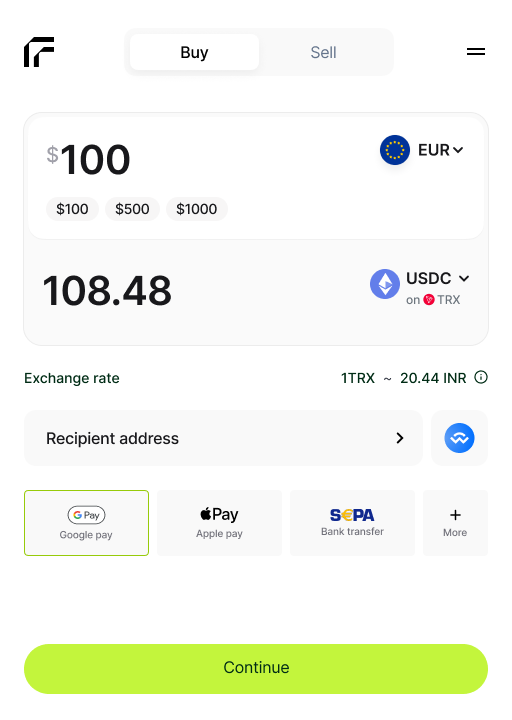
  <Step title="Quote Generation" icon="calculator">
    The client requests a quote with purchase parameters.

    <Frame>
      <img src="https://mintcdn.com/rampnow/WiraXsZDY9bcUT7J/images/onramp/quote-page.png?fit=max&auto=format&n=WiraXsZDY9bcUT7J&q=85&s=d9aec2b58361b659ef474d7bcfeee3fd" alt="Quote generation interface" width="350" data-path="images/onramp/quote-page.png" />
    </Frame>

    **Request includes:**

    * Fiat currency
    * Payment method
    * Token & blockchain
    * Purchase amount

    **Rampnow returns:**

    * Total cost breakdown
    * Network fees
    * Payment processing fees
    * Token amount to receive
    <Tip>Quotes are deterministic and guaranteed upon checkout</Tip>
  </Step>

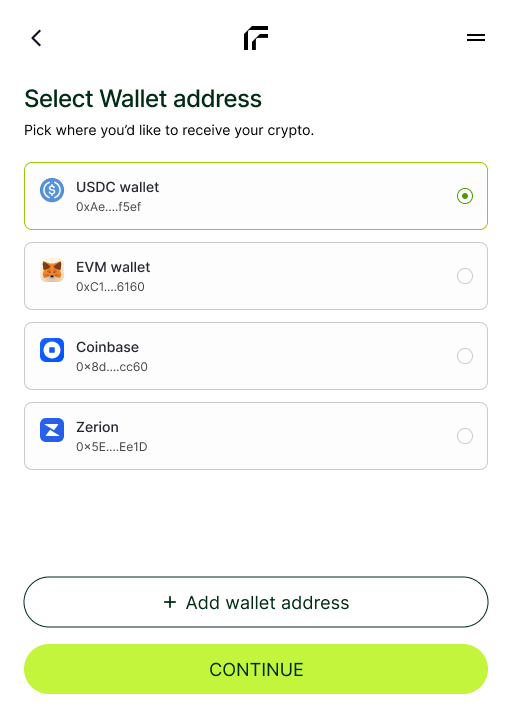
  <Step title="Wallet Address Input" icon="wallet">
    User provides the destination wallet address.

    <Frame>
      <img src="https://mintcdn.com/rampnow/WiraXsZDY9bcUT7J/images/onramp/wallet-address.png?fit=max&auto=format&n=WiraXsZDY9bcUT7J&q=85&s=5bd690aa14be01c3ce21e3e8af55f350" alt="Quote generation interface" width="350" data-path="images/onramp/wallet-address.png" />
    </Frame>

    **Address validation checks:**

    * ✓ Correct blockchain network
    * ✓ Account Abstraction
    * ✓ Valid checksum format
    * ✓ Contract restrictions
    * ✓ Valid address format
    <Note>Users can manually enter an address or connect their wallet directly</Note>
  </Step>

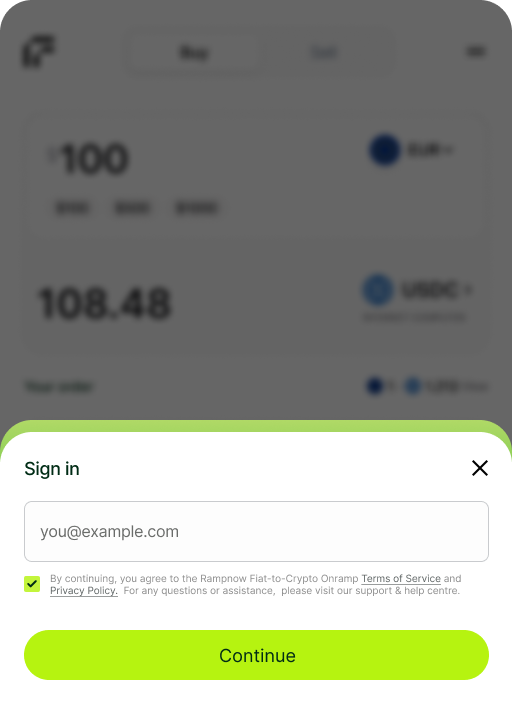
  <Step title="Email & OTP Verification" icon="envelope">
    Security verification to prevent fraud and ensure account validity.

    <Frame>
      <img src="https://mintcdn.com/rampnow/0Qw-KuDEH6QKpJCe/images/onramp/email.png?fit=max&auto=format&n=0Qw-KuDEH6QKpJCe&q=85&s=003956ee8b77ad5843c6f88fa6e5a2cf" alt="Email and OTP verification" width="350" data-path="images/onramp/email.png" />
    </Frame>

    **Verification process:**

    1. User enters email address
    2. OTP code sent to email
    3. User submits OTP
    4. Session validated and secured
  </Step>

  <Step title="Payment Processing" icon="credit-card">
    User completes payment using their preferred method.

    <Frame>
      <img src="https://mintcdn.com/rampnow/WiraXsZDY9bcUT7J/images/onramp/payment-processing.png?fit=max&auto=format&n=WiraXsZDY9bcUT7J&q=85&s=de2eebcf12072228a95cac6d9abdb49e" alt="Payment method selection" width="350" data-path="images/onramp/payment-processing.png" />
    </Frame>

    **Supported payment methods:**

    <Tabs>
      <Tab title="Cards">
        * Visa
        * Mastercard
          <Tip>Instant processing</Tip>
      </Tab>

      <Tab title="Bank Transfers">
        * SEPA (EU)
        * FPS (UK)
        * PIX (Brazil)
        * PayID (Australia)
        * UPI (India)
      </Tab>

      <Tab title="Digital Wallets">
        * Apple Pay
        * Google Pay
        * Local APMs
      </Tab>

      <Tab title="Open Banking">
        * Direct bank connection
        * Lower fees
        * Higher limits
      </Tab>
    </Tabs>

    **Status updates via:**

    * Real-time webhooks
    * API polling
  </Step>

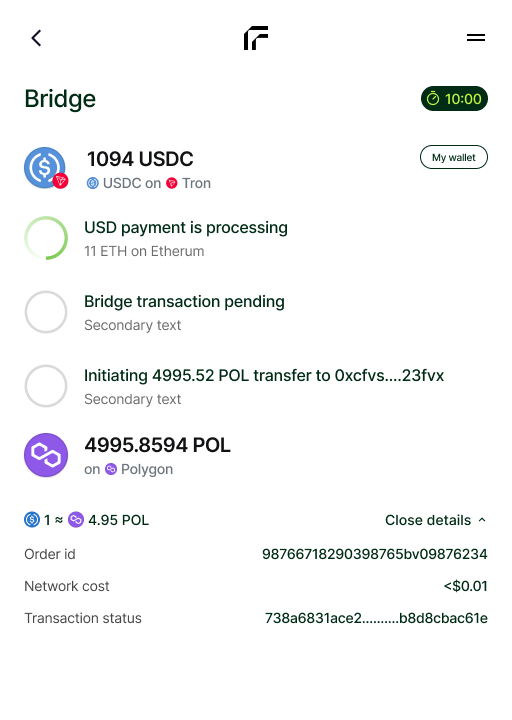
  <Step title="Settlement" icon="building-columns">
    Funds are settled and crypto is prepared for delivery.

    <Frame>
      <img src="https://mintcdn.com/rampnow/0Qw-KuDEH6QKpJCe/images/onramp/exchange.png?fit=max&auto=format&n=0Qw-KuDEH6QKpJCe&q=85&s=5444f80ef0537393b8b792700d7200ec" alt="Payment method selection" width="350" data-path="images/onramp/exchange.png" />
    </Frame>

    **Settlement process:**

    1. Payment confirmation received
    2. Funds settle to banking partners
    3. Routing engine triggers liquidity movement
    4. Crypto assets prepared for blockchain delivery
    <Info>Settlement times vary by payment method (instant to 1-3 business days)</Info>
  </Step>

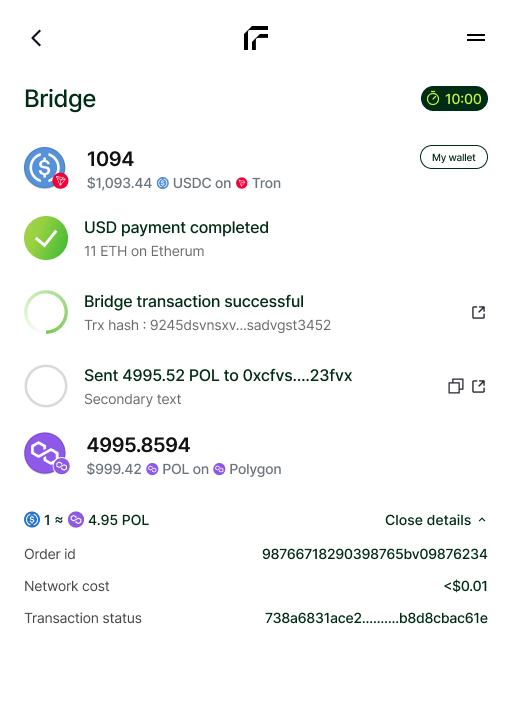
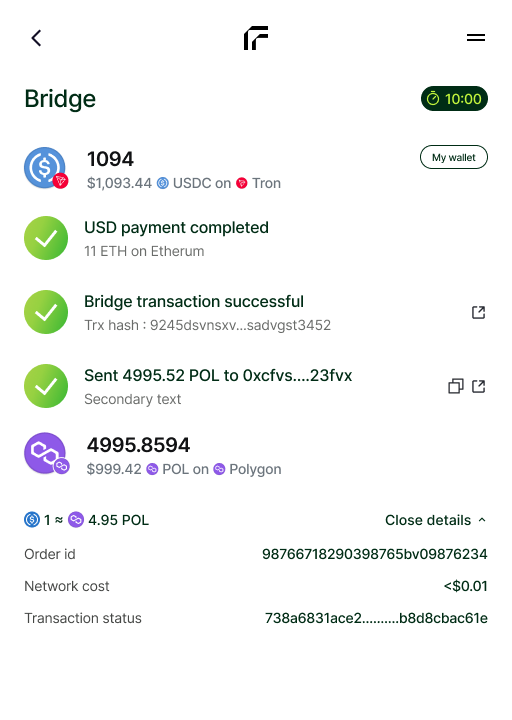
  <Step title="Token Delivery" icon="paper-plane">
    Tokens are delivered to the user's wallet address.

    <Frame>
      <img src="https://mintcdn.com/rampnow/0Qw-KuDEH6QKpJCe/images/onramp/success.png?fit=max&auto=format&n=0Qw-KuDEH6QKpJCe&q=85&s=6ad1491aa0dcac8b00ab3ea4b21a74c0" alt="Token delivery to wallet" width="350" data-path="images/onramp/success.png" />
    </Frame>

    **Delivery process:**

    1. Transaction broadcast to blockchain
    2. Network confirmation
    3. Transaction hash generated
    4. Final delivery confirmation
  </Step>

  <Check>Transaction complete! Users can track their tokens on the blockchain explorer.</Check>
</Steps>

***

## Flow Characteristics

<div style={{display: 'grid', gridTemplateColumns: '1fr 1fr', gap: '1rem'}}>
  <Card title="Consistent" icon="check-double">
    Same experience across all regions and payment methods
  </Card>

  <Card title="Optimized" icon="gauge-high">
    High conversion rates with minimal friction
  </Card>
</div>

***

## Integration Options

<div style={{display: 'grid', gridTemplateColumns: '1fr 1fr', gap: '1rem'}}>
  <Card title="Widget Integration" icon="window" href="/api-reference/widget-mode">
    Embed the complete flow with minimal code
  </Card>

  <Card title="API Integration" icon="code" href="/api-reference/hosted-mode">
    Build custom flows with full control
  </Card>
</div>

***

## Next Steps

<Steps>
  <Step title="Review API Documentation">
    Learn how to implement each step programmatically
  </Step>

  <Step title="Test in Sandbox">
    Use test credentials to simulate the complete flow
  </Step>

  <Step title="Handle Webhooks">
    Set up event listeners for real-time status updates
  </Step>
</Steps>

<Card title="Ready to integrate?" icon="rocket" href="/api-reference/about-API">
  Start with our Integration guide
</Card>