> ## Documentation Index
> Fetch the complete documentation index at: https://docs.rampnow.io/llms.txt
> Use this file to discover all available pages before exploring further.

# Offramp Flow

> Step-by-step overview of the complete digital-asset-to-fiat withdrawal journey

<Info>
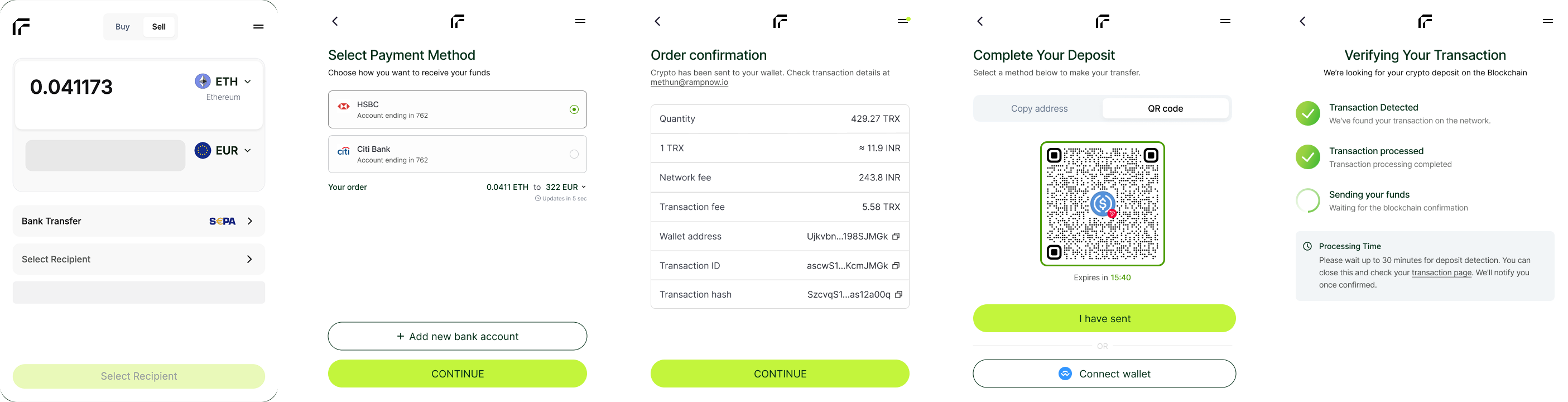
  This guide walks through the full offramp journey — from quote creation and asset transfer to fiat payout execution. Rampnow manages blockchain monitoring, liquidity routing and payout execution in every step.
</Info>

<Frame>
  <img src="https://mintcdn.com/rampnow/0Qw-KuDEH6QKpJCe/images/offramp/flow.png?fit=max&auto=format&n=0Qw-KuDEH6QKpJCe&q=85&s=06efdabb951b5473eb9941ac0e63075f" alt="Offramp flow diagram" width="2810" height="720" data-path="images/offramp/flow.png" />
</Frame>

## Complete Withdrawal Journey

<Steps>
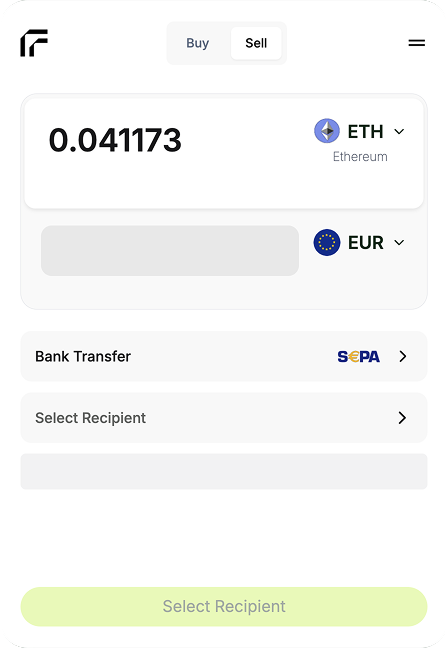
  <Step title="Sell Quote Generation" icon="calculator">
    The client requests a **sell quote** specifying the digital asset being sold and the target fiat currency.

    <Frame>
      <img src="https://mintcdn.com/rampnow/0Qw-KuDEH6QKpJCe/images/offramp/quote.png?fit=max&auto=format&n=0Qw-KuDEH6QKpJCe&q=85&s=02ad3a7baecb5dc7a31fbd0dcae372fb" alt="Sell quote page" width="350" data-path="images/offramp/quote.png" />
    </Frame>

    **Request parameters:**

    * Token & blockchain
    * Crypto amount
    * Desired payout currency
    * User region (auto-detected or provided)

    **Rampnow returns:**

    * Estimated fiat amount
    * FX and payout fees
    * Network fee
    * Estimated payout arrival time
    * Available payout methods
    <Tip>Quotes are deterministic and guarantee the payout amount after asset confirmation.</Tip>
  </Step>

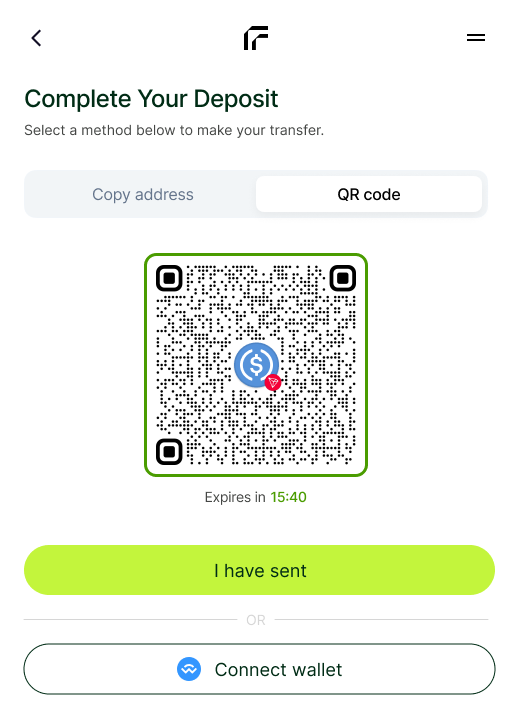
  <Step title="User Sends Crypto" icon="wallet">
    The user initiates a blockchain transfer to the **specified deposit address** generated for the order.

    <Frame>
      <img src="https://mintcdn.com/rampnow/0Qw-KuDEH6QKpJCe/images/offramp/qr.png?fit=max&auto=format&n=0Qw-KuDEH6QKpJCe&q=85&s=7ae6a0129d77b2355561c360248f9582" alt="User sending crypto" width="350" data-path="images/offramp/qr.png" />
    </Frame>

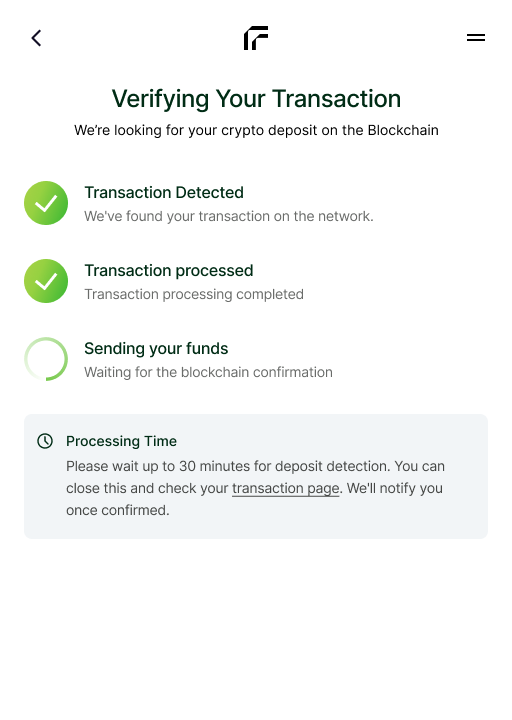
    **Rampnow monitors:**

    * Incoming transaction
    * Confirmations on the blockchain
    * Token matching & amount validation
    * Expiration handling if no funds are received

    **Status transitions:**

    * `pending_asset` → waiting for user
    * `asset_received` → funds confirmed
    <Note>Each order has to be updated with transaction has for accurate reconciliation.</Note>
  </Step>

  <Step title="Fiat Payout Execution" icon="building-columns">
    Rampnow sends fiat to the user's bank or local payout method.

    <Frame>
      <img src="https://mintcdn.com/rampnow/0Qw-KuDEH6QKpJCe/images/offramp/payout.png?fit=max&auto=format&n=0Qw-KuDEH6QKpJCe&q=85&s=66d0487332ff8d662ff75f604d03a8a4" alt="Payout screen" width="350" data-path="images/offramp/payout.png" />
    </Frame>

    **Supported payout rails:**

    <Tabs>
      <Tab title="Bank Transfers">
        * SEPA (EU)
        * Faster Payments (UK)
        * Local rails in supported regions
      </Tab>

      <Tab title="Instant / Local Systems">
        * UPI / IMPS (India)
        * PIX (Brazil)
        * Other local payout methods (regional availability)
      </Tab>

      <Tab title="Card / Wallet (Coming Soon)">
        * Visa Direct
        * Mobile wallets
        * Regional payout partners
      </Tab>
    </Tabs>

    <Tip>Payout timing depends on the selected rail (instant → 1–2 business days).</Tip>
  </Step>

  <Step title="Order Completion" icon="check-circle">
    Once fiat is delivered, the offramp flow is completed and final confirmations are issued.

    **Final outputs:**

    * Transaction hash (crypto side)
    * Banking reference / trace ID (fiat side)
    * Final webhook: `order.completed`

    <Check>Users can track blockchain delivery and payout references for transparency.</Check>
  </Step>
</Steps>

## Flow Characteristics

<Columns cols={2}>
  <Card title="Transparent" icon="eye">
    Clear fees, FX and payout timelines communicated upfront
  </Card>

  <Card title="Reliable" icon="check-double">
    Deterministic routing and predictable payout execution
  </Card>

  <Card title="Global" icon="globe">
    Multi-currency coverage and cross-border payout capabilities
  </Card>
</Columns>

## Integration Options

<div style={{display: 'grid', gridTemplateColumns: '1fr 1fr', gap: '1rem'}}>
  <Card title="Widget Integration" icon="window" href="/api-reference/widget-mode">
    Drop-in offramp widget with complete flow
  </Card>

  <Card title="API Integration" icon="code" href="/api-reference/hosted-mode">
    Full control over order creation, UI and payouts
  </Card>
</div>

## Next Steps

<Steps>
  <Step title="Review Offramp APIs">
    Understand how to create sell quotes and orders via API
  </Step>

  <Step title="Implement Webhooks">
    Receive status updates for payout tracking and reconciliation
  </Step>

  <Step title="Explore Supported Currencies">
    Check available fiat currencies, payout rails and regional limits
  </Step>
</Steps>

<Card title="Ready to integrate the Offramp?" icon="rocket" href="/api-reference/about-API">
  Start with the API documentation
</Card>